
| ?@ |  Simple Quote Simple Quote |
This section describes how to enquiry stock quote from Power Securities.
In the Place Order screen, you may either enter the stock code in the order placing area, or enter in the quotation area.
Please be noted that ??Real-Time?? quote is only available for client who has subscribed streaming RTQ service.
If you have not subscribed any streaming RTQ service or only subscribed ??Price Snapshot?? service, it will only provide???Delayed-Quote?? data.
For example,input Stock Code:1
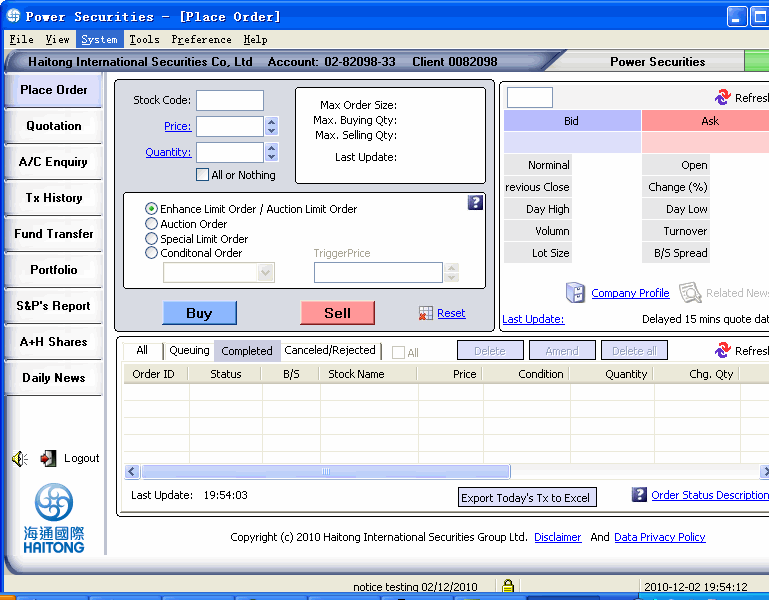
You can enquire real time quote from Power Securities if you have subscribed
RTQ through Haitong eServices. Below is an example:
For definition of terms, please click: terms and definitions
For example,input Stock Code:1
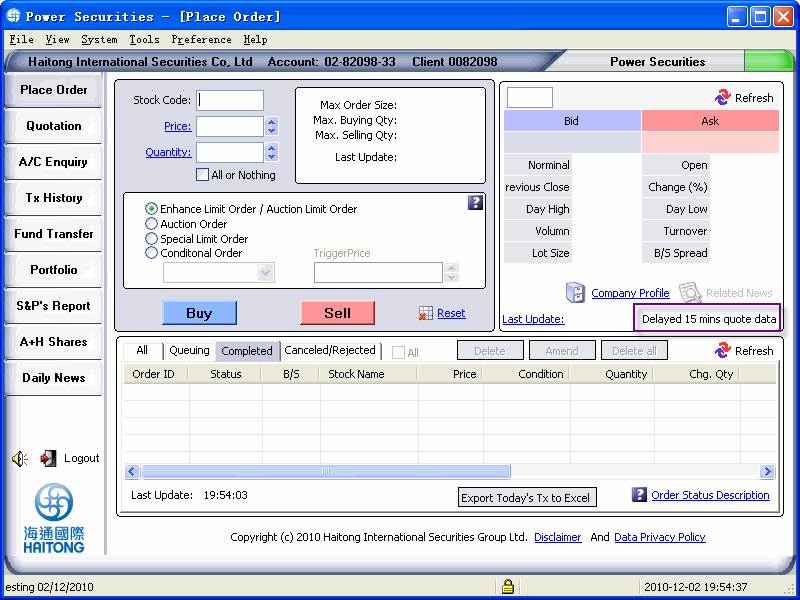
On the other hand, in order to make Buy/Sell more convenient, you can
click on the Bid/Ask price in Simple Quote panel and the trade operation
panel will be automatically filled with the stock code, Bid/Ask price
and minimum trading quantity .
 terms and definitions of Simple Quote?G
| Terms | Definition |
| Bid Price | Best price for purchase |
| Ask Price | Best price for sales |
| Nominal | Current stock price |
| Open | Stock price of market open |
| Previous close | Closing price of previous day |
| Change% | Change= current price-previous close change%= (change*100/previous close)% |
| Day High | Highest stock price |
| Day Low | Lowest stock price |
| Volume | Accumulate volume of transaction |
| Turnover | Accumulate turnover of transaction |
| Lot Size | Quantity per board lot |
| B/S Spread | Spread price of bid price/ Ask price |
| Last Update | 1.If the enquired stock is not existed, expired
or the application cannot get the quote properly, the relevant stock
information and last update time will not be shown. Click Last Update to see more details. |
|
 Reminder?G
 ??0?? will be
added in front of the stock number if it is not in 4 digits
??0?? will be
added in front of the stock number if it is not in 4 digits