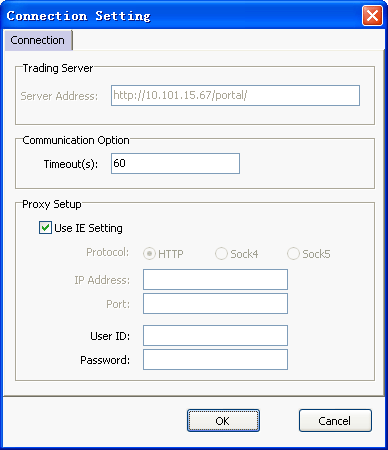
 Connection Setting Connection Setting |
The Power Security is supported by Proxy.
 Procedures:
1.Go to [System] and select [Connection Settings]:
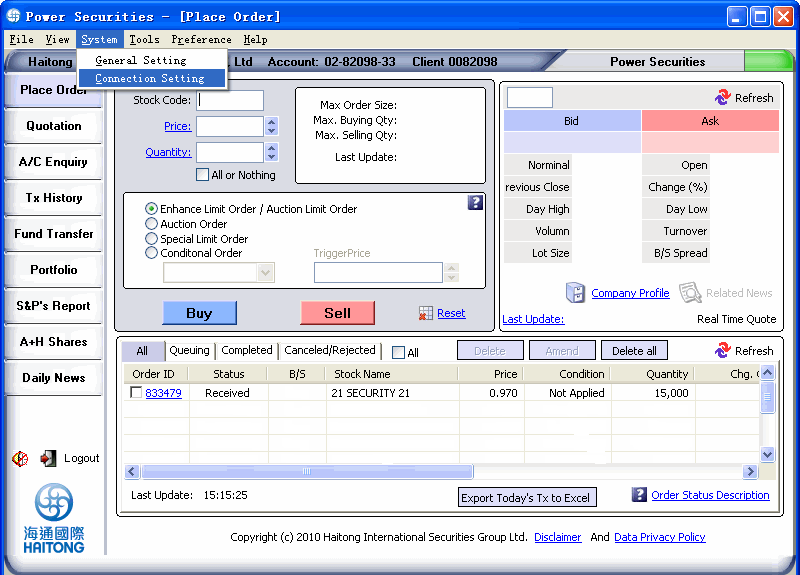
2.[Connection Settings] page will be pop up. Please enter the necessary
information for the setup and press the [OK] button to confirm.
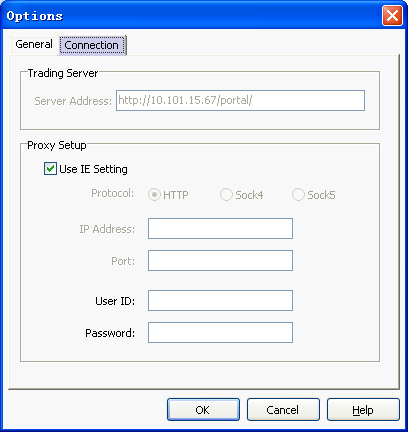
If you would like to implement the proxy setup, please perform below steps in [connection setting] page:
- Select the suitable protocol. For instance, http;
- Enter the IP address of proxy server for connection. For example, 192.168.1.12;
- Enter the port, e.g. 80??
- Input your login ID of the proxy server;
- Put in the password and press [OK];
Then the system will connect to the proxy server 192.168.1.12 through port 80 for communication.
If you do not change the connection setting, system will be connected by the default connection.
Attention:
You may also select the [Connection Setting] on the login page for setting.
To manipulate connection setup in login page, please see the following
steps:
1. press [Connection Settings] in login page:
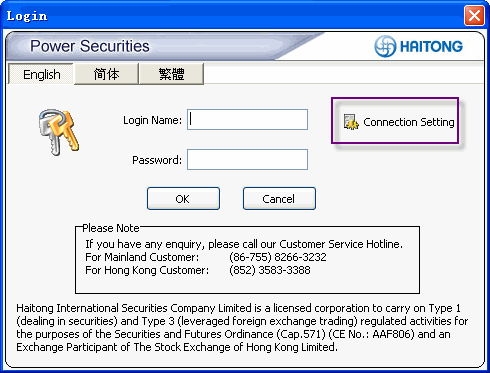
2.[Connection Settings] page will be pop up. Please enter the necessary
information for the setup and press the [OK] button to confirm.