
| ?@ |  General setting
 |
General setting conclude Lock screen,Correspondence
time-out device,Sound device and Broadcast news device.
 Procedures?G
1. Go to [System] and select [General Settings]:
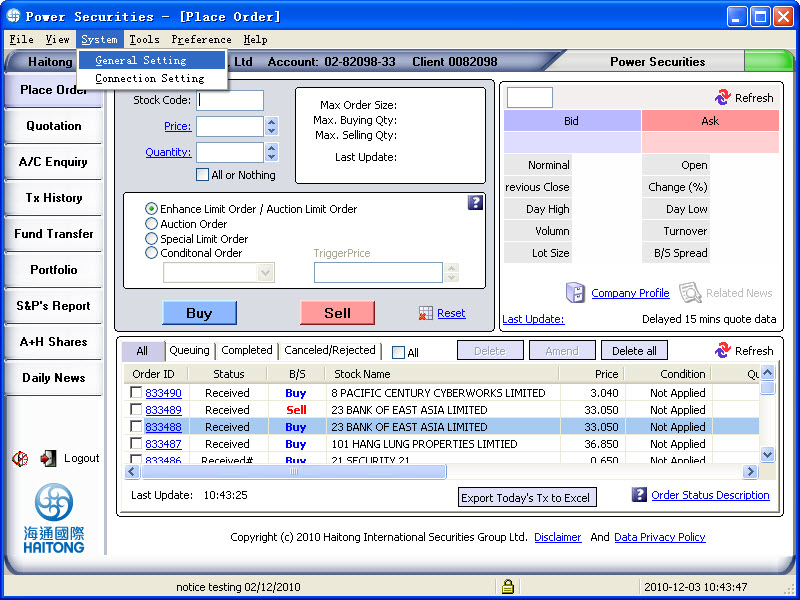
2.Pop up General setting window and put in your prefernce timing.
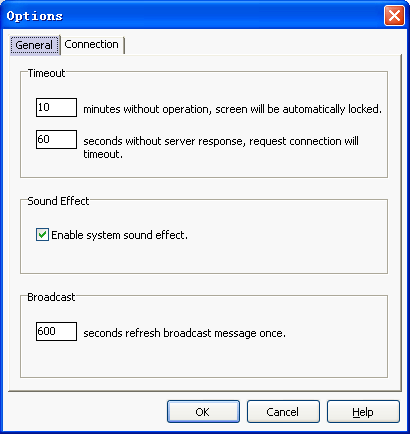
Lock screen: Enter the locking time, if the system do
not function within several minutes, the system will automatically be
locked.The default automatically locked time is 10 minutes.And you can't
set the time less than 10 minutes.
Correspondence time-out device: When the system or network
is busy, customer request may not be responsed, if the system receives
no reply within a prescribed time, the system will automatically cease
to function with a relevant reminder.The default timeout settint time
is 60 seconds,and you can't set the time less than 60 seconds.
Sound device: If you have chosen sound effect, then
there will be a sound reminder when you use the system to carry out stock
transaction in the Hong Kong market such as placing new order, amending
or deleting orders).
Broadcast news device: The time interval of updating
broadcast news can be modified by setting this device. The default refresh
setting time is 600 seconds,and you can't set the time less than 60 seconds.
| Pre Page | Back | Next Page |