
| ?@ |  Order
book Order
book |
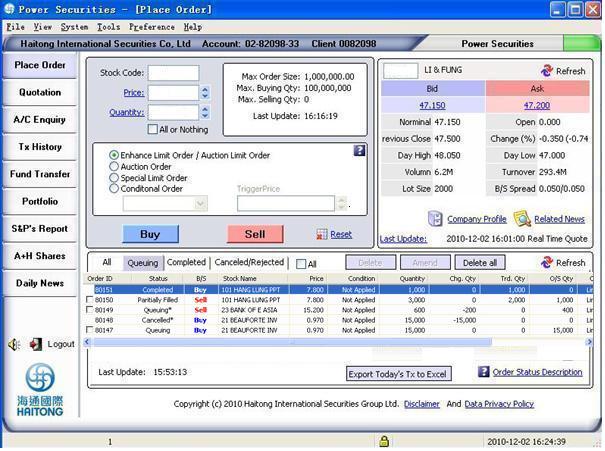
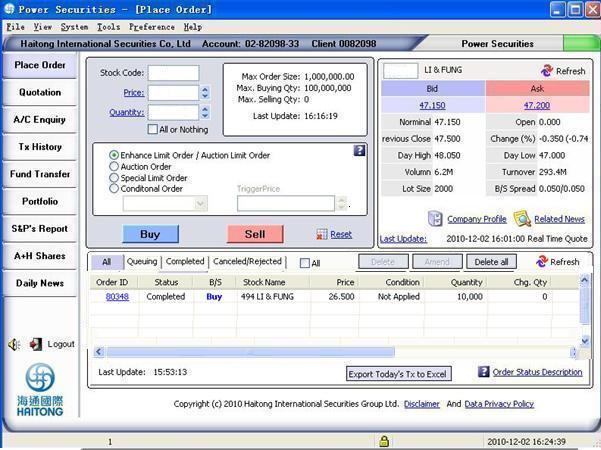
This section mainly introduces you the function of inquiring trading status. By entering the ??Place Order??, you can see 4 areas of information:
 Order
records Enquiry
Order
records EnquiryAll the order records of the current day, including executed and not executed record can be searched from the order book. It includes information such as: Order ID, Status, B/S, Stock Name, Price, Conditions, Quantity,Chg.Qty,Trd.Qty,O/S Qty,Ord Type, All- or ?VNothing (AON),Channel etc.
For definition of terms, please click: Order details description
The order records as follows:
Trading
details Enquiry
1.Order details will be shown by double clicking the inquired record.
For definition of terms, please click: Order details description
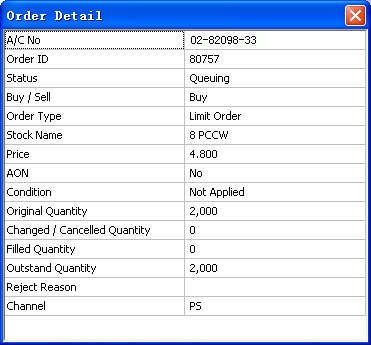
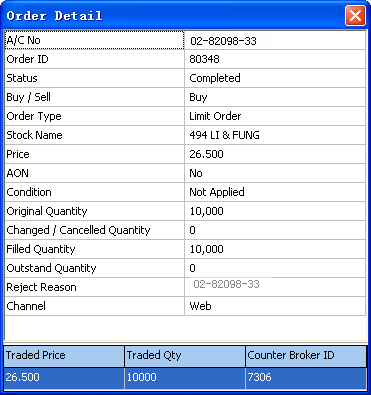
2. To view Trade records (Including completed and partially filled).
Sort
order
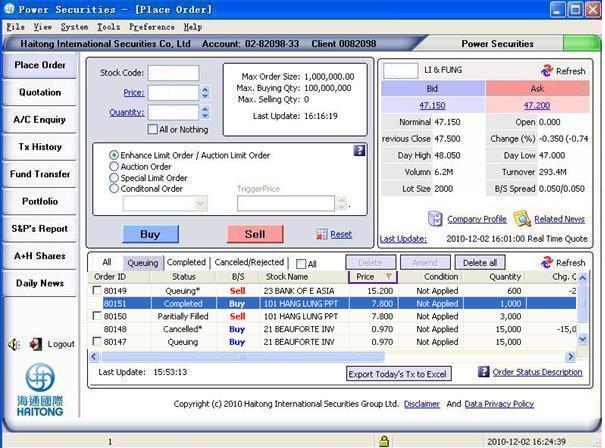
Select a column for sorting trade records in sequence order or descending order. The up arrow represents the order in sequence and the down arrow represents the descending order. Click [refresh] to sort by sequence.
Trading
status
You may select the status page for browsing your
order status.
e.g. click [completed] for your completed orders.
 Order details description in order book?G
| Terms | Definition |
| Order ID | A single record is given by the system for each trade |
| Status | Order status?]see Order status description?^ |
| B/S | Buy/ Sell order requests |
| Stock Name | Showing the stock number and name?C |
| Price | Latest order price |
| Condition | If the order is Conditional Order, the trigger direction (Up trigger or down trigger) and trigger price will be shown. If the order is not Conditional Order, ??Not applied?? will be shown. |
| Quantity | Initial quantity of orders |
| Chg.Qty | Quantity amended/ cancelled |
| Trd.Qty | Filled quantity |
| O/S Qty | Outstanding quantity to be filled |
| Ord Type | Type of order |
| AON | To show whether the order is ??All or nothing??. |
| Channel | Order channel used for order placing, PS represents Power Securities |
Order status description | Status | Definition |
| Received | Haitong Trading System received the order. Your request will be sent to HKEX. |
| Transmitting | Order is transmitting to Haitong Trading system. |
| Queuing | Order is queuing for execution in HKEX. |
| Partially filled | Your order has been partially filled. |
| Completed (Partially) | Order is partially filled and the remaining amount is cancelled. |
| Completed filled | Order is completely filled. |
| Cancelled | Order has been cancelled. |
| Rejected | Order has been rejected. |
| sign?G* | Cancellation/Modification Success (The latest cancel/modify instruction
is successfully executed) |
| sign?G# | Cancellation/Modification Fail (The latest cancel/modify instruction
is rejected) |
| sign?G@ | Cancellation/Modification is in progress (The latest cancel/modify
instruction is processing and waiting to be submitted to HKEx) |
Filtering page in order book| Status | Definition |
| All | Showing order??s status including: transmitting, received, queuing, partially filled. Completed (partially), completed filled, cancelled and rejected. |
| Queuing | Showing all the received and queuing & partially filled orders. |
| Completed | Showing the completed (partially) and completed filled of orders. |
| Cancelled/ rejected | Including orders that are cancelled and rejected . |
 Reminder:
  The order type
of ALO and ELO will be shown as [limit order] The order type
of ALO and ELO will be shown as [limit order] |