
| ?@ |  Buy
HK Stocks Buy
HK Stocks |
This section talks mainly about the operation of buying HK stocks. On the page of ??Place Order??. firstly fill in the stock code, the page shows the upper limit of the cash amount for buying, also the largest quantity of sales and the latest updated time; the system will show on its right the name of stock, the stock code represented and the quote about that stock.
Then fill in price (please pay attention to the regulation of price), the page will show the maximum order size of stock. Next fill in quantity, press [Enter] and finally select the type of transaction (about the definition of transaction types, please click the Definition of Order Types).
To check different order types and trading time session, please click Pre-opening Session Securities Trading Services and Order Features. The newly appeared window will offer the information of your order-placing request. Please enter password after confirmation (you do not need to enter password if you have cancelled password protection), press enter to finish ordering. For regulation of filling in information, please read: For buying & selling stocks.
 Ordering process as follows:
1.On the page of Place Order, fill in the stock number, bid price and quantity. For example:
?@?@?@Stock number:21
?@?@?@Price: 0.97
?@?@?@Quantity: 15000
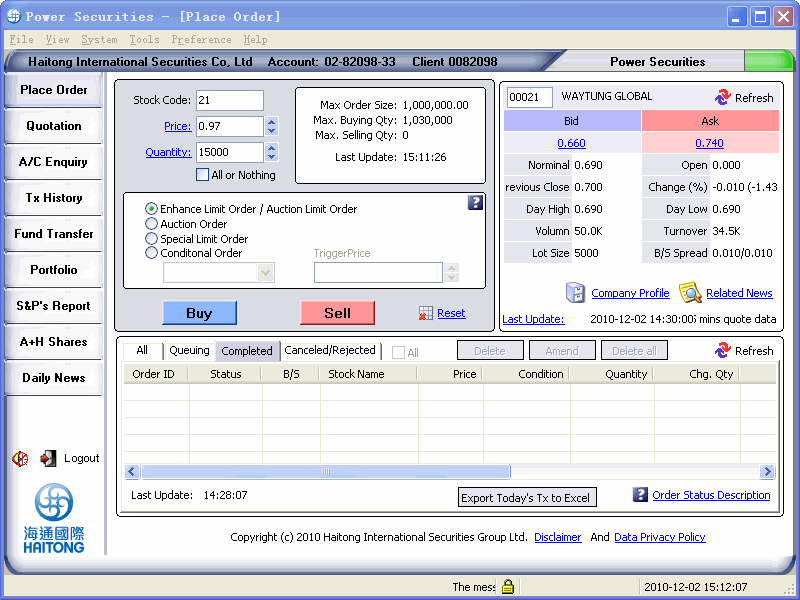
By click the [Reset] button which next to the [Sell] button can clean the trading data and reinput again.
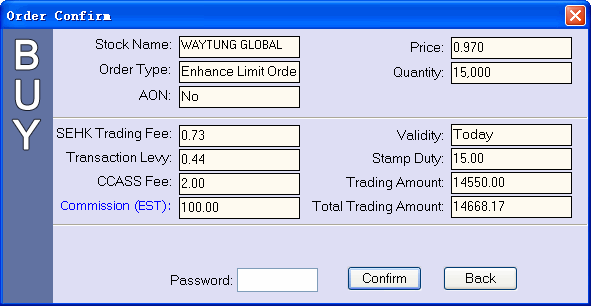
2.Press [Buy] to make sure the information of your order-placing request
and input your password, then click[enter].
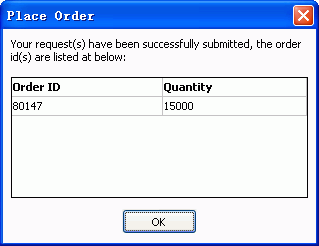
3. Press [ok] to finish the ordering process,and system will make sound effect if you have set enable system sound effect.
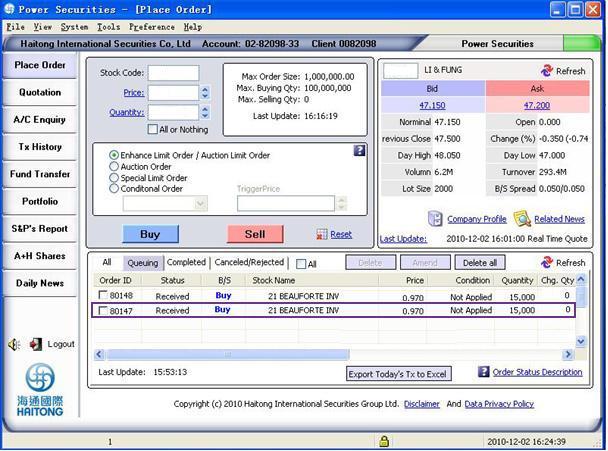
4.Check the order in your order book:
 Any
unfilled Enhanced Limit Order will be put in queue as Limit Order at the
same price
Any
unfilled Enhanced Limit Order will be put in queue as Limit Order at the
same price
Any unfilled Enhanced Limit Order will be put in queue as Limit Order
at the same price. Amendment to Enhanced Limit Buy / Sell Order can be
made only at a price not higher than the best ask / a price not lower
than the best bid prices or else the amendment will be rejected by the
system.
 Reminder?G
 About the usage
of price, quantity and triggering price boxes, please refer to the
usage of up and down buttons. When the system
cannot gather the information of the price of each per board lot (and
the space will be blank), the up and down buttons of quantity turns
gray in colour is not usable. Please refer to
the triggering price regulation when placing
condition-triggering order. Click
here to see the process if you place order with quantity over
3000 per lots. About the usage
of price, quantity and triggering price boxes, please refer to the
usage of up and down buttons. When the system
cannot gather the information of the price of each per board lot (and
the space will be blank), the up and down buttons of quantity turns
gray in colour is not usable. Please refer to
the triggering price regulation when placing
condition-triggering order. Click
here to see the process if you place order with quantity over
3000 per lots. |