

















- Home
- /
- Our Business
- /
- Wealth Management
- /
- Online Services
- /
- Trading Channels
- /
Futures & Options
Product Overview
You can trade any futures or options with computers connected to the Internet. With Haitong International, trading is made easier with functions including:
Local Futures and Options: Provision of different order types include GTC orders, Stop-Limit orders, Trigger orders, Fill or Kill orders, Fill and Kill orders, etc.
Real-Time Quotes: Clients can subscribe to web futures real time quote services to get hold of abundant market information, as well as research reports and tools.
Chart: Differnet technical analysis and charting tools allow you to forecast market changes, equipping you for any kind of turbulence.
Account Enquiries: Detailed account information allows you to have a clear view of your financial status.
Trading Simulator System: You can practice your skills and test your insights using our simulator system. It will prepare you well for trading in the real market.
Order Types
| Condition | Description | |
|---|---|---|
| Validity | Fill or Kill (Fok) | Fill or Kill means that the order is to be matched, immediately after submission, at the exact quantity specified in the Qty field or else it will be canceled automatically by the system at once. |
| Fill and Kill (Fak) | Fill and Kill means that the order is to be matched, immediately after submission, as much as possible, up to quantity specified in the Qty field and the remaining unmatched portion, if any, of the order will be canceled automatically by the system at once. | |
| Today (Limit or Auction Order) | It means unmatched/unconcealed orders will remain in the system (or order book) until the market close of the day. Auction Order There is no specified price for auction orders. They are only applicable during pre market and after market auction sessions. Limit Order To buy or sell a set number of contracts at a specified price or better. | |
| GTC | It means that unmatched/uncancelled orders will remain in the system (or order book) until the market close of the expiration day of the product. | |
| GTD Date | Specified Date. It means that unmatched/uncancelled orders will remain in the system (or order book) until the market close of the business date specified in the Date field. | |
| AO | An auction order. An order that does not have a price limit assigned. An auction order is ready to be matched at the Calculated Opening Price (COP) during the Pre-market Opening Period. At the end of the Pre-market Opening Period all unmatched auction orders will be converted to either limits orders or inactive orders. | |
| Market Price | To buy or sell an investment immediately at the best available current price. (The order enters as a limit order with the protection price limit equal to the trigger price plus or minus the pre-defined protection point range of the exchange.) | |
| Stop/Trigger order | Stop Limit | Buy Order When market price is equal to or more than the stop loss price, your buy order will be sent to market. Sell Order When market price is equal to or less than the stop limit price, your sell orders will be sent to market. |
| Up Trigger | If market price is higher than or equal to the trigger price, your buy order will be sent to market. | |
| Down Trigger | If market price is lower than or equal to the trigger price, your sell orders will be sent to market. | |
| Stop Market | Buy Order (limit price equal to the trigger price plus the pre-defined protection point range of the exchange.) When market price is equal to or more than the stop loss price, a market order to buy will be sent to market. The executed price may be higher than the stop loss price. (Extreme price movement or insufficient liquidity may cause the order to be placed in the order book at the protection price limit.) Sell Order (limit price equal to the trigger price minus the pre-defined protection point range of the exchange.) When market price is equal to or less than the stop limit price, a market order to sell orders will be sent to market. The executed price may be lower than the stop price. (Extreme price movement or insufficient liquidity may cause the order to be placed in the order book at the protection price limit.) | |
| Validity Date | The specified date for GTD | |
| Inactive | Means the orders entered will be inactive. Unless changed to active, otherwise it will not be sent out to market. This function allows clients to preset any orders they may want to place and when the time is right, they can immediately change the orders to active to be matched in market immediately. | |
| Validity | |
|---|---|
| Condition | Fill or Kill (Fok) |
| Description | Fill or Kill means that the order is to be matched, immediately after submission, at the exact quantity specified in the Qty field or else it will be canceled automatically by the system at once. |
| Condition | Fill and Kill (Fak) |
| Description | Fill and Kill means that the order is to be matched, immediately after submission, as much as possible, up to quantity specified in the Qty field and the remaining unmatched portion, if any, of the order will be canceled automatically by the system at once. |
| Condition | Today (Limit or Auction Order) |
| Description | It means unmatched /unconcealed orders will remain in the system (or order book) until the market close of the day. Auction Order There is no specified price for auction orders. They are only applicable during pre market and after market auction sessions. Limit Order To buy or sell a set numvber of contracts at a specified price or better. |
| Condition | GTC |
| Description | It means that unmatched/uncancelled orders will remain in the system (or order book) until the market close of the business date specified in the Date field. |
| Condition | GTD Date |
| Description | Specified Date. It means that unmatched/uncancelled orders will remain in the system (or order book) until the market close of the business date specified in the Date field. |
| AO | |
|---|---|
| Description | An auction order. An order that does not have a price limit assigned. An auction order is ready to be matched at the Calculated Opening Price (COP) during the Pre-market Opening Period. At the end of the Pre-market Opening Period all unmatched auction orders will be converted to either limits orders or inactive orders. |
| Market price | |
|---|---|
| Description | To buy or sell an investment immediately at the best available current price. (The order enters as a limit order with the protection price limit equal to the trigger price plus or minus the pre-defined protection point range of the exchange.) |
| Stop/Trigger order | |
|---|---|
| Condition | Stop Limit |
| Description | Buy Limit When market price is equal to or more than the stop loss price, your buy order will be sent to market. Sell Order When market price is equal to or less than the stop limit price, your sell orders will be sent to market. |
| Condition | Up trigger |
| Description | If market price is higher than or equal to the trigger price, your buy order will be sent to market. |
| Condition | Down Trigger |
| Description | If market price is lower than or equal to the trigger price, your sell orders will be sent to market. |
| Condition | Stop Market |
| Description | Buy Order (limit price equal to the trigger price plus the pre-defined protection point range of the exchange.) When market price is equal to or more than the stop loss price, a market order to buy will be sent to market. The executed price may be higher than the stop loss price. (Extreme price movement or insufficient liquidity may cause the order to be placed in the order book at the protection price limit.) Sell Order (limit price equal to the trigger price minus the pre-defined protection point range of the exchange.) When market price is equal to or less than the stop limit price, a market order to sell orders will be sent to market. The executed price may be lower than the stop price. (Extreme price movement or insufficient liquidity may cause the order to be placed in the order book at the protection price limit.) |
| Validity date | |
|---|---|
| Description | The specified date for GTD |
| Inactive | |
|---|---|
| Description | Means the orders entered will be inactive. Unless changed to active, otherwise it will not be sent out to market. This function allows clients to preset any orders they may want to place and when the time is right, they can immediately change the orders to active to be matched in market immediately. |
Remarks: Fill or Kill (Fok), Fill and Kill (Fak), AO, Up Trigger, Down Trigger only available in HK futures.
「Product Overview」|「Points to Note」|「Online Products」|「Trading Particulars」|「Order Types」|「Trading Info」|「Contract Margin」|「Prevention of Physical Delivery Risk」|「“Power Futures” Two-Factor Authentication Login Setting Risk Disclosures」|「SP Trader Weekly HSI and HSCEI Index Options User Manual」
Product Overview
Power Futures is a one-stop online trading platform. Apart from 24 hours free quotation services, it also supports with various order types and efficient order placing. It allows you to manage different investment products easily including :
Local Futures & Options
Stock Futures
Overseas Futures
(Including products from NYMEX, CME, CBOT, SGX, NYBOT, EUREX,LIFFE)
How to login?
After installation, a shortcut will be placed on your desktop for access to the software. Upon login, you will choose your profile [POWER FUTURES] or input powerfutures.htisec.com in "Host" and enter your account number (01-xxxxxxx-00) together with your password.
System Requirement
Pentium III 800 MHz CPU or above
Monitor: 1024x768
Win 7 or above
Internet broadband connection of 2MB or above
Memory: 256 MB or above
Hard disk space: 100M
Firewall/Proxy setting (if exists): Open TCP port 8080 to 8089
System Features
Provision of different order types include GTC orders, Stop-Limit orders, Trigger orders, Fill/Kill orders, Fill and Kill orders, etc.
Free Real time quotes and charts for monitoring of account movements and details
Provision of streaming real time quotation with 50 market depths.
Featuring "Options Master" real time quotation system, which provides volatility reference and risk factors for all options products, including Delta, Gamma, Theta and Vega, which aims to help investors to manage their portfolio on real time base.
Click-to-order function is available.
Points to Note: Power Futures
Please click here for the Points to Note.
Online Trading Products (Overseas Futures)
Notes:
** Quotations are reference using USD in consistent with market practice, however, the reference price shown on monthly and daily statements will be shown in USD.
^ The contract Last Trading Day of contract comes before the First Notice Day.
# If you are interested in trading this product, please first contact your AE or our dealing department (852) 2213 8333.
Close Out Deadline are stated for the closest contract month. For enquiry of other contract months or other Overseas Futures product information, please contact our dealing department (852) 2213 8333 or our customer service hotline (852) 3583 3388 or 400 001 1822.
Trading Particulars
| Electronic trading period | From HK time 07:00 to 06:15 next day (New York winter time) |
| Closeout period | From HK time 06:15 to 07:00 (New York winter time) |
| Order placing | Orders can be placed directly via Power Futures during trading period: 1. Power Futures provides electronic trading overseas futures.2. Web Futures Trading can be used only for account enquiry and status checking for overseas futures. Alternatively, you can place orders by contacting your account executive or our dealing department (852) 2213 8333 during market open period. Information such as order status and margin requirements will be shown only after execution on Power Futures and Web Futures Trading. During closeout period, please contact your account executive and dealing department for any changes, cancelation, and enquiry of your order(s).* |
| Effective period of outstanding order | Orders are only effective within the same day . They will be canceled automatically according to closing time of different exchanges. All outstanding orders after market close will be canceled without prior notification (including limit order, stop loss order, up trigger order, and down trigger order). |
*AE commission scheme applies to trades done not by way of Power Futures or TWS, but through account executive, dealing department.
P.S. New York winter time applies unless otherwise specified.
Month code
| Month | Code | Month | Code |
|---|---|---|---|
| 1 | F | 7 | N |
| 2 | G | 8 | Q |
| 3 | H | 9 | U |
| 4 | J | 10 | V |
| 5 | K | 11 | X |
| 6 | M | 12 | Z |
Order Types
| Limit order | An order to buy a specified product at or below a specified price, or to sell at or above a specified price. |
|
| Conditional Order: | Type of order that allows an investor to specify conditions upon which the order would occur. If those conditions are not met, then the investor's specific order will not be executed. | |
| Stop Limit | Stop Limit | |
|---|---|---|
| Up Trigger | Up Trigger | |
| Down Trigger
| Down Trigger Example
| |
| FAK | Fill and Kill means that the order is to be matched, immediately after submission, as much as possible, up to quantity specified in the Qty field and the remaining unmatched portion, if any, will be canceled automatically by the system at once. |
|
| FOK | Fill or Kill means that the order is to be matched, immediately after submission, at the exact quantity specified in the Qty field or else it will be cancelled automatically by the system at once. |
|
| Inactive | It is not a tradable order unless activated and placed to market by investor. |
|
P.S. Winter time shall apply.
*Enhanced Order Types
| Enhanced Limit Order | This order type is comprised of 2 parts: 1. Toler: acts as a simplified version of Stop Limit Order When you place orders, you would not need to input the limit price. Instead, you will only need to choose your direction (Buy or Sell), then enter the trigger price and toler points. Sometimes the market may be too volatile, therefore your predefined limit price may not be executed. In this case, you may use Toler function to help you stop loss. 2. Trailing Stop: enhances the function of Stop Limit Order When you use this order type, the conditional stop limit order point will fluctuate at the same magnitude as the market index points. It can help you lower the loss points and at the same time helps you maximize profits. | Enhanced Stop Limit Example |
| One Cancels Other (OCO) Order | OCO Order can be used for Stop loss or Stop profit. You may place both types of orders at the same time, however, only one of them will be executed and the other will be cancelled at the same time. OCO Orders can help you maximize your profit as well as limit your loss. | OCO Order Example |
| Bull & Bear Order | This order type includes both Bull and Bear order. You can place a set of buy or sell position and at the same time place your settle orders. You will open a long or short position, then when the market has moved the predetermined index points, and meet your order conditions, you positions will be settled automatically. | Bull & Bear Order Example |
| Time to Send Order | This time of order will be sent to market at preset date and time. | Time to Send Order Example |
*If you wish to apply for the above enhanced orders on power futures, please contact your Account Executive or our customer service hotline (852) 3583 3388 or 400 001 1822.
Trading Notes:
Enhanced Order Type function applies to Hong Kong Futures, Hong Kong Options and Overseas Futures. Please note, some Hong Kong options and overseas futures may have low trading volume or high volatility. As a result, the trigger prices may not be executed, for example:
Order will not be triggered if the product bid/ask price is highly volatile but without trade execution
Stop gain and stop loss orders of OCO order may be executed simultaneously (the order is executed before cancelation) when the price is fluctuating
Liquidity and price stability of products in NYBOT and SGX are relatively low. It is not recommended to place orders for these products using enhanced order types to avoid any wrong/inaccurate triggering. Please pay special attention to the risk and usage of Enhanced Order Types to prevent any disputes. TFSG (Haitong International Securities Group), its information providers and its licensors will under no circumstances be liable to you and/or any third party for any lost profits or lost opportunity, or any indirect, special, consequential, incidental or punitive damages whatsoever, even if TFSG, the information providers or the licensors have been advised of the possibility of such damages.
Please ensure the scheduled time for "Time to Send" orders are during market open hours, otherwise it will be deactivated. Moreover, the order will be rejected if the prior set price exceeds 5% of the current price at the triggering time (upper and lower limit of the system).
Enhanced Order Type function applies to Power Futures only. Web Futures does not support this function. Use of Web Futures will be temporarily terminated if clients apply for activating the Enhanced Order Type function.
We recommend you read the "User Guide" in Power Futures or descriptions and examples on the Haitong International website before using the Enhanced Order Type functions.
Our system will consider the margin requirements of all orders and positions (including Conditional Orders /stop limit orders which not yet triggered, and all inactive order instructions ) of clients to achieve better risk management.
Trading Info
Profit and Loss
Free real-time quotations are available for e-trading on Power Futures, therefore profit and loss positions of these products will be calculated from real-time quotes.
To trade other overseas futures and option products, please contact your Account Executive. Profit and loss positions of non e-trading products will be calculated using the closing price of the preceding trade day.
Since the buying power will be affected by profit and loss positions, the above-mentioned scenarios will therefore also affect the accuracy of buying power as shown on Power Futures.
Example | On Day 1, you successfully placed an order through your account executive for a non-electronic trading product at previous closing price of US$50. When market opened on Day 2, the price was US$75 and closed at US$80. |
Overseas options#
SPAN does not apply to overseas futures position and overseas options position in Power Futures. For overseas options, all orders can only be placed via telephone. Gross margin calculations apply to both long and short position.
Buying power for local and overseas futures will be underestimated if a client opens an overseas options position.
Example | If a client opened a long position in spot month light sweet crude oil futures, and a long position in call option, margin for 2 contracts are required. |
# Electronic overseas option trading services are not available on Power Futures. Orders must be placed through an account executive or dealing department. AE commission scheme applies.
Currency
We will use trading currency for settlement. If a negative balance occurs, we will automatically exchange to the relevant currency for trading without prior notice.
1) When there is a negative foreign currency balance in the futures account
- Negative foreign currency balances in overseas markets
If the client holds the same foreign currency balance in the local market, we will transfer the foreign currency from the local market to the overseas market to settle the outstanding amount.
If the client does not have the same foreign currency balance in the local market, we will first convert all the foreign currency negative balance in the overseas market into HKD. As the account will have negative HKD balance, we will arrange to transfer the HKD in the local market to the overseas market to settle the negative HKD balance. If the client only has other foreign currencies in the local market, we will first convert the foreign currency into the required HKD and then transfer it to the overseas market to settle the HKD balance.
- Foreign currency negative balance in the local market
If the client holds the same foreign currency balance in the overseas market, we will transfer the foreign currency from the overseas market to the local market to settle the outstanding amount.
If the client does not have the same foreign currency balance in the overseas market, we will first convert all the negative foreign currency in the local market into HKD. As the account will therefore have a negative HKD balance, we will arrange to transfer the HKD in the overseas market to the local market to settle the negative HKD balance. If the client only has other foreign currencies in the overseas market, we will first convert the foreign currency into the required HKD and then transfer it to the local market to settle the negative HKD balance.
2) When there is a negative HKD balance in the futures account
- Negative HKD balances in the local market
If client hold HKD balances in overseas markets, we will transfer HKD from overseas markets to the local market to settle the outstanding amount.
If client does not hold HKD balance in the overseas market but holds a single type of foreign currency in the account, we will convert the foreign currency into HKD and then transfer it to the local market to settle the negative HKD balance.
If the client holds positive balances in multiple foreign currencies in the account (such as USD, JPY and EUR), we will first convert the USD into HKD and transfer them to the local market to settle the outstanding amount. If the client does not have a positive balance in USD or the positive balance in USD is not sufficient to pay the outstanding amount in HKD, we will convert the foreign currency with the largest HKD equivalent value to pay the outstanding amount. If the outstanding amount in HKD is still not fully paid after the conversion, we will convert the foreign currency with the second largest HKD equivalent value to pay the outstanding amount, and so on, until the outstanding amount in HKD is fully paid or there is no positive balance in foreign currency in the account.
- Negative HKD balances in overseas markets
We will transfer HKD from the local market to overseas markets to settle the outstanding amount of the client who hold HKD balances in the local market.
If the client does not hold HKD in the local market but holds a single type of foreign currency in the account, we will convert the foreign currency into HKD for the client and then transfer it to the overseas market to settle the negative HKD balance.
If the client holds positive balances in multiple foreign currencies in the account (such as USD, JPY and EUR), we will first convert the USD into HKD and transfer them to the overseas market to pay the outstanding amount. If the client does not have a positive balance in USD or the positive balance in USD is not sufficient to pay the outstanding amount in HKD, we will convert the foreign currency with the largest HKD equivalent value to pay the outstanding amount. If the outstanding amount in HKD cannot be fully paid after the conversion, we will convert the foreign currency with the second largest HKD equivalent value to pay the outstanding amount, and so on, until the outstanding amount in HKD is fully paid or there is no positive balance in foreign currency in the account.
3) When the securities account holds HKD balance
If the client has HKD balance in the securities account with the Group, we may transfer the funds in the client's securities account to the futures account to pay the outstanding amount.
Clients may deposit the relevant currency to meet the margin requirements and avoid exchange losses arising from fund transfers. All exchange gains and losses arising from currency conversion shall be borne by the client, and the exchange rate of the relevant currency shall be determined by us at our sole discretion. If the futures account does not hold any foreign currency or there is still a debit balance after the above foreign currency conversion and fund transfer are carried out by us, the client may be subject to margin calls. If the futures account fails to meet the minimum margin requirements on the day, we may force close the opened positions held by the client without prior notice of margin calls. In addition, if the client fails to deposit sufficient funds or submit transfer instructions to transfer funds from other accounts within the specified time, we will suspend the opening of new futures positions for the client until the account holds sufficient margin.
Note 1 Negative balance = Total cash + Commodity floating profit and loss – Initial margin
Note 2 The transfer arrangement is executed in accordance with the terms and conditions of the futures account you have entered into with us
4) What is the standard for foreign exchange rates?
We will provide currency exchange services to the client based on the total outstanding amount of foreign currency in the client's account (margin for open positions + floating losses) at the foreign currency exchange rate set by us on the day.
5) Will the foreign currency balance be automatically converted back to HKD if there is a surplus after any global futures contracts in the futures account are closed?
As we cannot predict whether the client will continue to use the foreign currency for investment transactions during the day, the foreign currency balance in the account will be retained. We will only convert the foreign currency balance in the account into HKD upon receiving the instruction from the client. Therefore, clients need to pay attention to the risk of exchange rate changes caused by holding foreign currencies.
Risk of low liquidity
In the futures market, some products may have low liquidity due to various reasons. The bid ask spread may be large or there are temporarily no buyers or sellers. Some forward contracts may also have liquidity problems. We would not suggest you to use Conditional/ Stop Loss Orders to process such orders. Conditional and Stop loss orders are triggered according to market price. If the product has low liquidity, even if the price was triggered due to fluctuation in other markets, the criteria may not actually exist (There was no successful order price in the particular market), or even if there are transactions, it may not be triggered due to lack of bid / ask requests, and it may also be a bust trade due, so the purpose of stop loss/ stop gain orders may not be reached. For these orders, we would recommend the use of Limit Orders instead.
Online trading of London Metal Exchange (LME) Products
LME product features:
LME products are traded in the form of forward contracts, different from normal futures products which have a designated 1 prompt date each month. LME products have a daily prompt date from each trade date.
The most active contracts are 3-month products, such as 3-month copper and 3-month aluminum.
The prompt dates are different if the positions are not opened on the same trade date. For example, the prompt date of 3-month copper long position opened on March 1 is June 1, while the prompt date of 3-month copper short position opened on March 7 is June 7. Since the prompt dates are different, long and short positions with different trading dates cannot be squared off.
To close positions, the client needs to execute a carry trade to square off the long and short positions with different prompt dates.
LME online trading system:
Haitong International trading platform provides price quotes and trading service for 3-month products to clients by connecting to LME SELECT system.
Trading products include: Aluminum, Copper, Lead, Zinc, Nickel, and Tin.
Trading period:
From HK time 08:00 to 02:00 next day (New York summer time)
From HK time 09:00 to 03:00 next day (New York winter time)
Close position:
Except for the long and short positions with the same trade date and same prompt date, long and short positions with different trade dates cannot be squared off. To close the position, the client should place the carry trade.
If a pair of long and short positions is not squared off by a carry trade, they will be treated as spread month contracts and spread margin will be required.
If the prompt dates between the open and close positions are 14 days or above, a single-side commission will be charged for the carry trade.
To place a carry trade order, clients can contact the Account Executive or Dealing Department (852) 2213 8333.
The price of carry trade is determined by the contango/ backwardation of the product at the time which depends on the supply and demand of the market.
Square off the deadline of the unsettled position:
Our company does not offer “Physical delivery”. All unsettled positions should be squared off 3 working days before the prompt date (“Square off deadline”). If the client cannot square off the position and conduct the carry trade before the square off deadline, our company will perform a force square off on the day after Square off deadline. The client cannot make any objection to the forced square off price. Any reverse online trade done after the square off deadline will be treated as a new position.
Liquidity risk
In SELECT trading system, some LME products may have low liquidity. The bid/ask spread may be large or there may be temporarily no buyers and/or sellers. We would not suggest the client to place conditional/stop loss orders during low liquidity. It is because the conditional/stop loss orders are triggered by market traded price. If the product has low liquidity, the order may not be executed after the condition is triggered, or the price is far away which leads to a poor trade price. It is advised to use a Limit order when the liquidity is low.
Contract Margin
Margin for all electronic overseas futures products are calculated based on gross margin requirement* instead of SPAN.
Initial margin and maintenance margin, which are equal to gross margin, are the same for all electronic trading overseas futures margin requirement.
Sufficient buying power is required for placing order(s) which would result in the increase of margin level.
Exposure limit is set in every account for risk management purpose. Orders will be rejected if the margin level exceeds the exposure limit, regardless of buying power. Please contact your account executive to adjust the exposure limit if necessary.
Our system will consider the margin requirements of all orders and positions (including Conditional Orders /stop limit orders which not yet triggered, and all inactive order instructions ) of clients to achieve better risk management.
*P.S. Margin level calculations on Power Futures are based on gross margin while those on daily/monthly statements are based on SPAN.
| Example | SPAN applies to margin calculations of local futures. |
Prevention of physical delivery risk
Our local and overseas futures products provided in the Power Futures and mobile trading apps# can be settled in cash or by physical delivery. However, other than USD/CNH Futures contracts and USD/CNH Options traded in the HKFE, we do not offer physical delivery arrangement for any other futures contracts. As such, clients are reminded to close out or roll over their positions on or before the close-out deadline in order to avoid forced liquidation^ and physical delivery risk. For details of physical delivery of USD/CNH Futures and USD/CNH Options, please visit the link on our website below:
http://v211.cn/sites/all/themes/hitong/files/Points_to_note_for_USDCNH_Futures_Trading_-_EN.pdfClients may close out or rollover their futures contracts with physical delivery feature before the close-out deadline via the online trading platform or by contacting their Account Executive or our Dealing Department*.
If the contracted First Notice Day precedes the Last Trading Day, clients may close out or rollover their positions only via the online trading platform starting from the second business day prior to the First Notice Day.
If the futures contract does not have the First Notice Day, clients may close out or rollover their positions only via the online trading platform starting from the business day immediately prior to the Last Trading Day.
If the contracted Last Trading Date precedes the First Notice Day, clients may close out or rollover their positions only via the online trading platform starting from the business day immediately prior to the Last trading Day.
All clients holding long positions have to close out or rollover their long positions via any trading channels at least 6 hours before market close of either the second business day prior to the contracted First Notice Day or the business day immediately prior to the Last Trading Day, whichever is earlier. Otherwise such long positions will be subject to forced liquidation^ at market price and at any time after the said deadlines and clients shall have no right of objection against the execution price. In such case, our company is not liable to the losses incurred from the handling of the said contracts and all unfilled close-out orders from clients will be mandatorily cancelled.
All clients holding short positions have to close out or rollover their short positions via any trading channels at least 6 hours before market close of the business day immediately prior to the contracted Last Trading Day. Otherwise such short positions will be subject to forced liquidation^ at market price and at any time after the said deadline and clients shall have no right of objection against the execution price. In such case, our company is not liable to the losses incurred from the handling of the said contracts and all unfilled close-out orders from clients will be mandatorily cancelled.
Clients have to close out or rollover their positions before the close-out deadline and in no event later than 6 hours before market close of the corresponding deadline as mentioned above, after which our company shall have the right to mandatorily close out all the outstanding positions at market price and at any time we deem appropriate^. All unfilled close-out orders from clients will be automatically cancelled.
Clients may still open a new short position starting from the second business day prior to the First Notice Day by contacting their Account Executive or our Dealing Hotline. However, clients are reminded to close out their short positions no later than the business day immediately prior to the Last Trading Day.
| Example | The Last Trading Day of Corn December 2015 (ZCZ5) is the trading day immediately prior to the 15th calendar day of the contract month, i.e. 14th December, 2015^^^. The First Notice Day is the last business day of the previous month, i.e. 30th November, 2015. |
# Including “Haitong International SP Mobile Futures Trading” and “Haitong International SPTrader Pro Mobile Futures Trading” apps.
*AE commission scheme applies for trades not done by way of Power Futures or TWS, but through your account executive or the dealing department.
^ Offline commission shall apply for forced liquidation.
^^ Given that 26th November, 2015 is the Exchange holiday, the First Notice Day of the futures contract will be changed to 25th November, 2015.
^^^ The Last Trading Day will be changed to the nearest Friday if the Last Trading Day falls on Saturday or Sunday.
Note: The above trading hours use New York winter time as reference.
User Guide
“Power Futures” Two-Factor Authentication Login Setting Risk Disclosures
Please click here to read “Power Futures” Two-Factor Authentication Login Setting Risk Disclosures
Product introduction
Haitong International Securities Company Limited unveils the brand new Haitong International SPTrader Pro HD mobile futures trading (iOS/ Android application), with which you can capture each golden investment opportunity. You can now download the iOS/ Android application and experience the ahead-of-the-curve trading futures and options investment services.
Hong Kong futures and options
Hong Kong stock futures
Global futures
(Including: NYMEX, CME, CBOT, SGX, NYBOT, EUREX and LIFFE)
Functions of the trading system
Round-the-clock Hong Kong Futures/ Stock Futures and Global Futures trading Service
Order Placing, checking, amending and canceling functions
Real-time Quotation* to keep you abreast of the market
Transaction details and futures account are available for your checking at any time for your flexibility to make your investment
Compatible with Power Futures on updating order instructions
The newly added chart (Professional Version) assists user on market analysis with user interface allowing settings at your disposal
The newly added “Good-till-cancel/ Specific date” features*
The newly added “Option Master” interface with a number of strike prices inclusive just on one page
*Depends on different products
Recommended system requirements
iOS 8.0 or above. Compatible with iPhone and iPad.
Supports smartphones or tablets with Android 4.0.3 to 7.0
Note:SPTrader Pro HD (phone application) developed by Sharp Point Limited can only function on certain mobile phones or tablets. Sharp Point Limited does not guarantee its compatibility of the platforms with all smartphones or tablets. The interface of this mobile application will be constrained by device models.
Application method
“SPTrader Pro HD” is now available on App Store/Google Play or you can scan the “download” QR code below for free download; log in with Power Futures login name and password for Haitong International clients.
Please input the domain below if you log in for the first time:
powerfutures.htisec.com (Hong Kong and oversea login)
powerfutures.htisec.com.cn (Mainland China login)
iPhone - iPad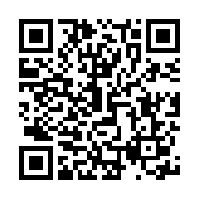 | iPhone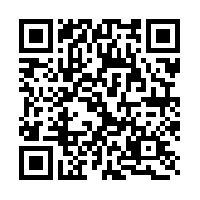 | Google Play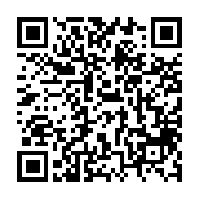 | Download |
Contact Us
Email: [email protected]
Enquiry Form: Please click below Enquiry Form
Hotlines
- Customer Service Hotline: (852) 3583 3388
- 400 001 1822
- Complaint Hotline: (852) 2801 6128
Letter
Write to us by mail or fax to our
Customer Service Department
15/F, One Island South, 2 Heung Yip Road
Wong Chuk Hang, Hong Kong
Fax: (852) 2530 1689
View the address of Customer Services Centre and Macau Office >>